
Reading Time: 5 minutes
An Essential Feature Is Missing in the Best Western App & Website. The BW Team Can’t Grasp It

Lately, I haven’t stayed too much in Best Western hotels. Mainly because my travels always had exciting other places I wanted to check out or their app has still a major issue, which I reported a long time ago and hasn’t been fixed. Best Western is often a great choice in more rural areas like the coastal areas of the Pacific Northwest. Best Western hotels are mostly the best chain hotels you can book in such areas. Not to say that there are not a lot of good local owned hotels, motels,…
It was time for me again to book a hotel and I was curious if Best Western would have a hotel nearby. However, they still haven’t fixed the bug with one of the most essential features for me and therefore I had to book with Marriott. Another stay lost to the completion for Best Western.
This post is less for the readers of my blog. This post is specifically geard towards the folks from Best Western. I talked to many agents and even supervisors on the phone and they can’t wrap their head around this simple feature and how it should work. They don’t even realize that it doesn’t work.
So what is this mysterious feature? It’s the map view of all the listed hotels when you do a search for a hotel at a certain place with your dates.
Note: If nothing else was mentioned, I am talking about the Android app, when saying app!
I use this feature all the time with every hotel chain. No other app has issues like the app of Best Western. This feature is important to me because I travel a lot for work. That basically dictates where I have to be for work. Since I don’t know every street in every city of this or other countries, I use the map feature. It’s easy for me to pin-point my work location and then see which hotel is closest.
There are two buttons on the upper right side of the window in the app. One is labeled “List” and the other one “Map”. I am sure, you as reader immediately know what the map button should do. It should bring up a map with the listed properties, right? That simple. However, Best Western representatives can’t wrap their mind around what that button should do.
I got answers like..
- This button doesn’t work in the app… (That’s right, but it should, that’s why it’s there or not?)
- This button just gives you a list of properties. (No, that’s why you have the List button)
- I don’t know what that means….(Well this person, was clearly the wrong one to talk to anyway…)
- Just use the website…(Why do you guys then have an app, if you guys seem to know it doesn’t work. That’s a headscratcher. By the way, the same issue is on the website if you view the mobile page)
- It’s my internet. (Definately not, as I can stream 4k movies without issue.)
- It’s my device! (Well than I must have pretty bad luck, as this would mean, 1 iPad, 2 Android phones, 3 Laptops, and numerous other devices are broken and can’t display the Best Western site correctly. But only the Best Western site)
- It’s my account. (How? Even if I am not logged in, the issue still persists. How can it be my account)
- …
It’s just so amazing how little knowledge, experience and common sense some people have. Some of the agents actually tried but they all came to the conclusion that the app is working as it should be.
History of the Issue
This problem started from day one when Best Western released their new “shiny” app. From day one (of my update to this version) I was unable to use the map button and reported it.
But the new app is less of an actuall app. It is more just “another” browser which accesses the Best Western website. Their website is programmed responsive. This means it will resize the content on any page automatically once the screen resolution changes.
Here is the problem…
Troubleshooting
Some agents even told me to use the website instead of the app. I tried but used the website on my phone and that’s where it clicked.
When, I tell the browser on my phone to open the website in “Desktop View”, it will actually show a map next to the list of hotels and then the button will also work. However, if you only look at the Best Western website with the mobile layout of the page, no map view is possible. Why? That’s a question for the developers of the website/app!
Another option would be to view the mobile website in landscape mode rather than portrait mode. Then you can actually click the “Map” button and it will show a map.
Unfortunately, the Android App doesn’t allow landscape mode. Boom! There we go again. The viewing field is to small and the browser, sorry I mean Best Western app, hides the map and just won’t show it. It’s such a nightmare that such a simple feature doesn’t work right. What’s even worse is that none of the agents I talked to can wrap their mind around this problem and recognize it as a problem.
If it’s actually intended to not give customers an app on the app or mobile website, then it would be just best by hiding that button in this views. This is actually super simple to implement. I even do it on this blog. You don’t need to be a rocket scientist button scientist for that.
Screenshots of the issue
How to use: Move the slider from left to right and you can see what happens when you click on the List button or Map button.
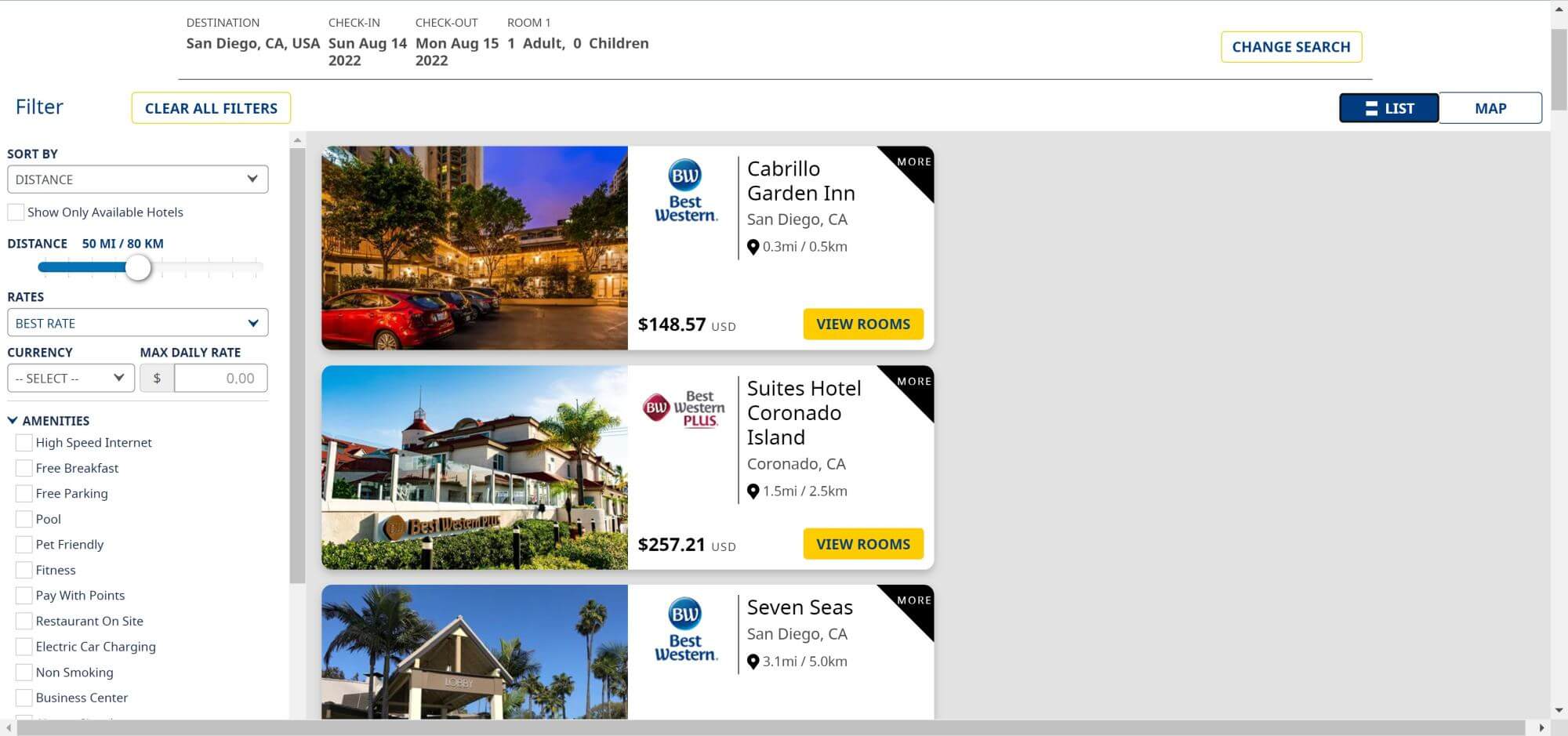


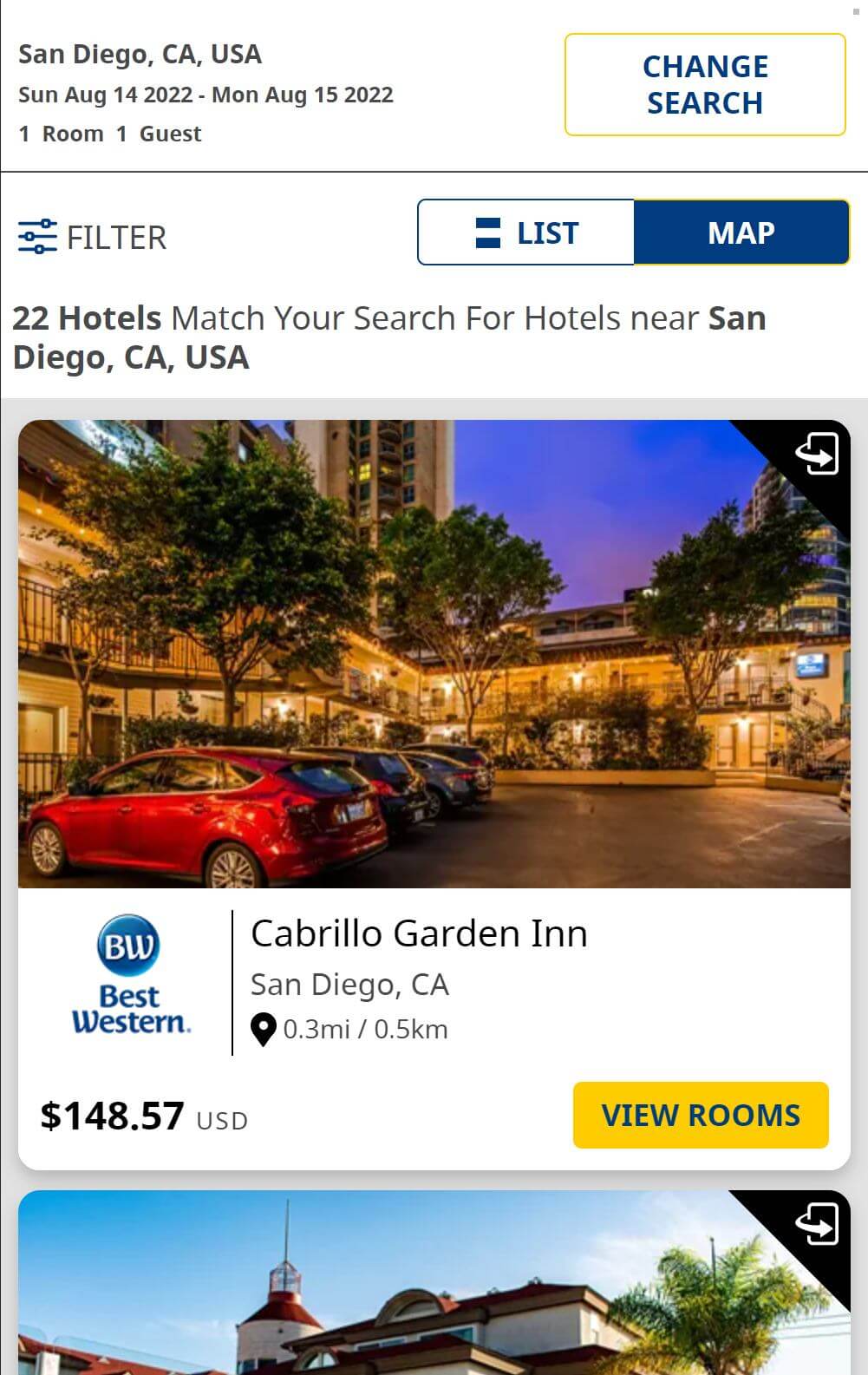
Instructions on how to reproduce the issue on your end
If you want to try it out for yourself. It’s super easy to reproduce the issue. You don’t even need the app, as it is basically just a browser anyway accessing the website as is. Therefore you can do all that testing on your computer. This instructions are meant especially for the Best Western team, who are not able to figure this out.
Open your browser and enter Developer mode. If your browser is Chromium based, like Google Chrome, Microsoft Edge, Vivaldi,… you can access that mode by pressing F12.
There is a button called “Toggle Device Toolbar“. Look at the screenshot below. You can also press Strg+Shift+M.
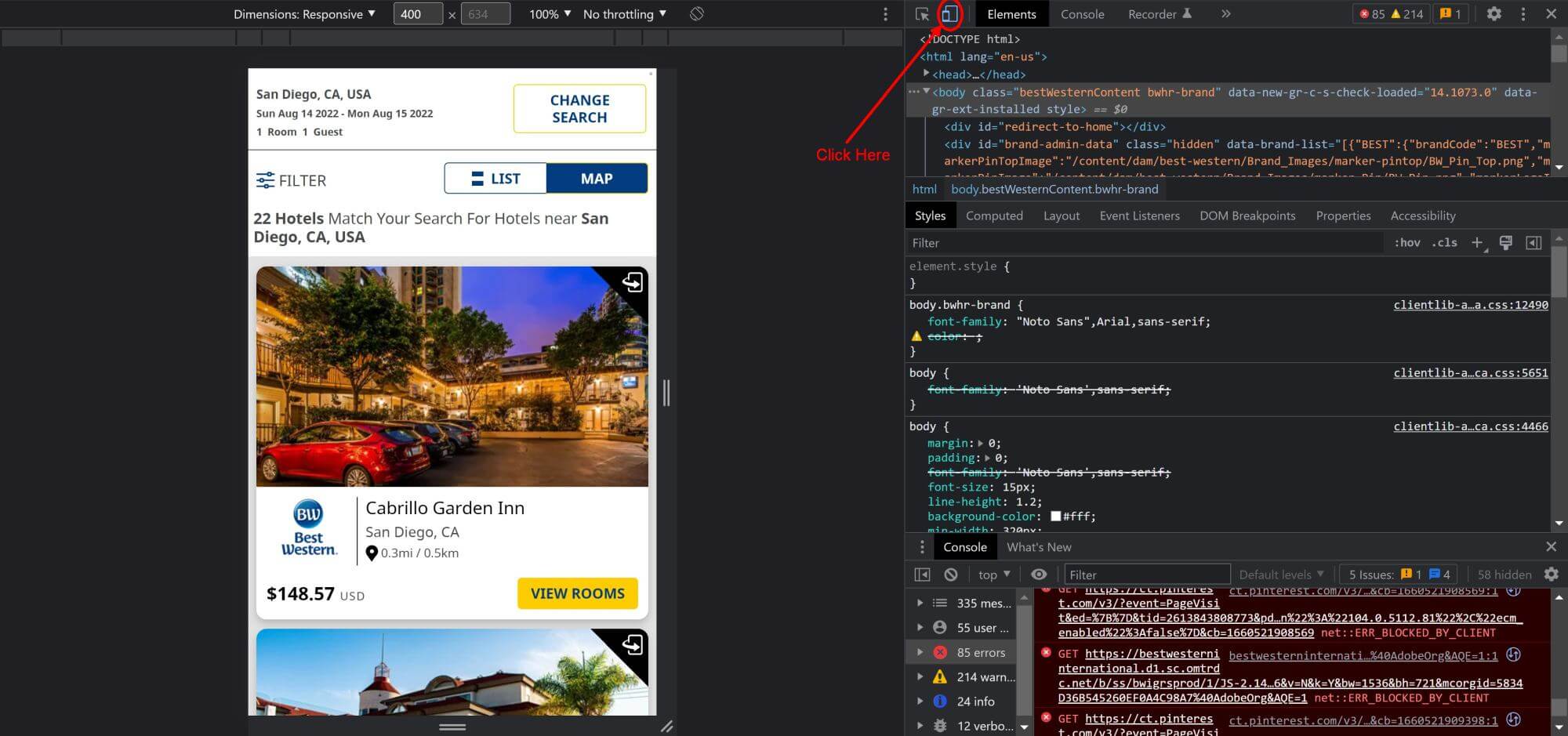
After further research, I found that the threshold value, where the map gets hidden, is a width of 767px. Is the width of the screen 767px or less, there won’t be a map. Everything above can see the map. It kinda has to be, in the bad way how they implemented the map. However, instead of showing it side by side, mobile views tend to re-order stuff from top to bottom. So for example Best Western could move the map to the very top of the screen when clicking on the map button. However, the rather decided to make the button useless on small screens.
That’s why the map works on my iPad pro with the big screen. The site recognizes it as a device with a viewing area of more than 767px.
What’s next?
I really hope Best Western will fix this. As 99% this information to visualize the hotels on a map is crucial for me to make a decision. But maybe Best Western doesn’t want my business anymore, even while being an elite for over a decade.
Dear Best Western team. Don’t you think I did all the work for you guys here, as nobody was able to figure this out in soo long. I don’t even know when all this started initially. For sure months ago, maybe even over a year? I lost track of time and stopped counting. I hope you appreciate what I did for you guys and how I broke it down.
I hope readers will chime in and let them know about their experience so they can actually see that this is a real issue and not just on only all of my devices!
Peter has a passion for Traveling, Photography, and Geocaching. These are the best ingredients for amazing adventures all over the globe. “Traveling is fun, no matter if you stay in a luxury hotel or travel like a backpacker.” Peter shares his experiences on his Blog www.gatetoadventures.com
Some of Peter’s photos are published on corporate websites, in-flight magazines, travel guides, and much more.



Subscribe
4 Comments

[…] as Best Western totally messed up their app and you can’t have a map view anymore. I have an in-depth post about it here.… Read more »
[…] Beach Hotel a day before my planned arrival. Before booking, I checked with Google Maps, as the Best Western app still lacks a map… Read more »
[…] Western is on track to make their app completely useless. It started when they stopped showing a map for your search results. This is… Read more »
[…] This stay is part of my holiday weekend road trip all the way from Seattle to San Diego. My goal was to get all… Read more »